📊
12 questions
Structured risk assessment directly inside the Jira issue. The answers yield a risk index and test-intensity recommendation.
Journey to Rome is our lightweight, questionnaire-based risk-assessment method, integrated right into Jira. From 12 simple questions per requirement it computes a risk index and the matching test intensity.
Journey to Rome is a simple risk-assessment method for any kind of requirement. Score the questions the process walks you through — from your own domain expertise or together with the requester — without needing input from developers. We have been developing the plugin since 2019 and run it on the Atlassian Marketplace, in use at customers worldwide.
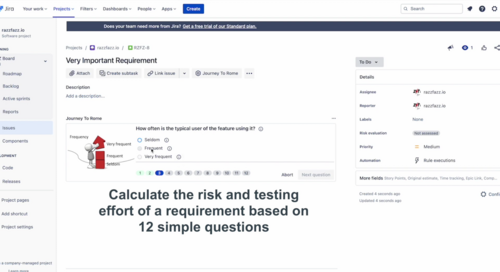
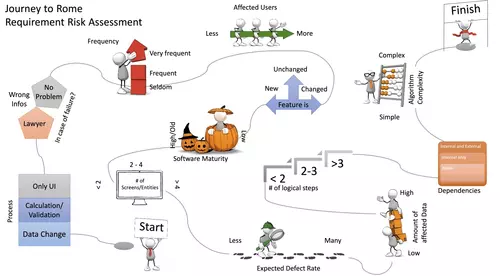
The process
The process walks you through the requirement one question at a time: how often is the feature used, and by how many people? Is it new, changed or unchanged? How complex are the algorithm and the flow, how mature is the software, how many screens and dependencies are affected — and what happens in case of failure? Every answer feeds the risk calculation.
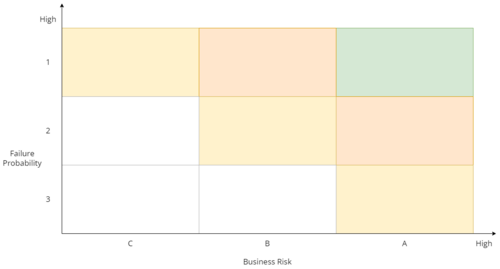
Risk categories
The Journey to Rome calculation shows the failure probability and the potential impact on your organisation in the form of failure-follow-up costs. The result is broken down into the risk categories Business Risk, Failure Probability and Functional Complexity. From these it computes a risk index from A1 to C3 and rates the required test intensity from 0 to 100.
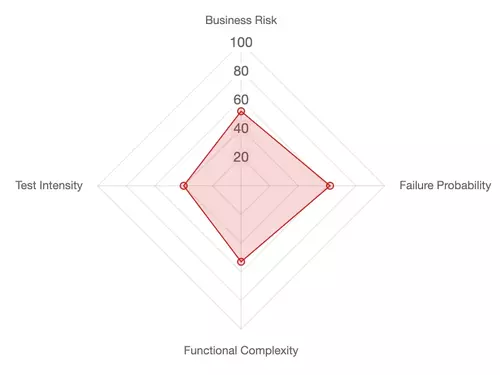
Test intensity
The test intensity is computed from risk and complexity and is a key indicator for risk-based testing and test management. Valuable decisions for test-case design and test planning can be derived from it too — the results guide where testing is needed most.
Structured risk assessment directly inside the Jira issue. The answers yield a risk index and test-intensity recommendation.
Seamless integration with Jira Cloud and Jira Server. No external app required.
Aggregated reporting across projects, releases, and teams. Make risk visible — and reduce it.
Installation in minutes. Free trial available.