The magical world of augmented reality: inspiring examples of immersive experiences
From Google Live View through archaeology and museums to haptic gloves
Augmented reality already holds a firm place in the everyday lives of many people, even if they may not be so aware of it. QR codes are found almost everywhere, and “VR” (virtual reality) is a familiar term to most people today. From impressive visual experiences to practical solutions, AR has the potential to extend our reality and lead us into a whole new dimension of interaction and immersion. Dive in with us as we explore a few exciting examples of how AR enriches our lives and changes our perception of the world!
AR navigation: the example of Google “Live View”
AR navigation in Google Maps is based on integrating augmented reality into the existing navigation functionality of the Google Maps app. Here is a basic description of how it works:
- Enter your destination: First, the user enters the desired destination into the Google Maps app.
- Start pedestrian navigation: Once the destination has been entered, pedestrian navigation is started by tapping the corresponding button.
- Activate AR mode: In pedestrian mode an AR button appears, allowing the user to activate AR navigation. Tapping this button activates the smartphone’s camera.
- Camera display and AR overlay: Once the camera is active, the live view of the user’s surroundings is shown on the display. Over this live view, Google Maps places an AR overlay with arrows, direction instructions and markers on top of the camera image.
- Signposts and visual cues: The AR overlay shows the user directional arrows and visual cues, such as street names or distance figures, directly in the camera view. This way the user can see the surroundings and receive visual instructions at the same time.
- Continuous navigation: The user follows the AR instructions and continues navigating, with visual guidance provided continuously.
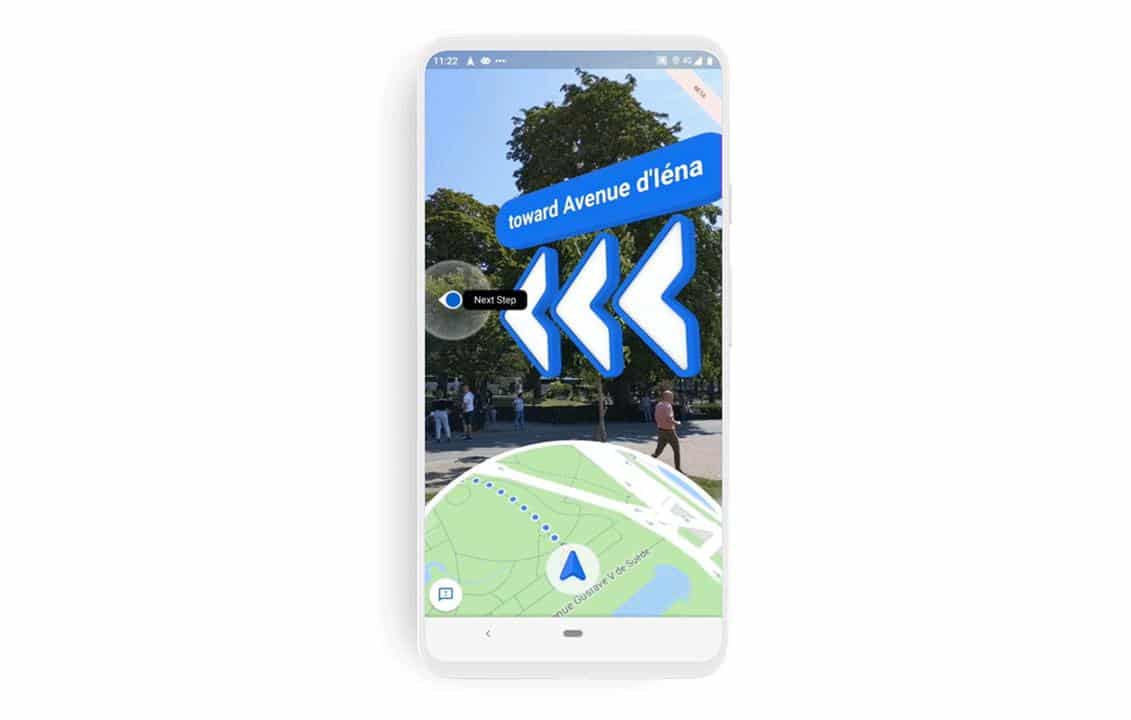
Source: Google Maps Community
Limitations
Because this technology orients itself by the surroundings, there are some limitations to the navigation. In the specific case of Google Maps navigation, good Street View coverage of the region is a prerequisite for “Live View” to become available at all. Furthermore, when activating it, the camera must be pointed at buildings and signs in order to orient itself. If there aren’t enough reference points, the navigation fails. In addition, the same applies to this kind of navigation as to any sat-nav: independent judgement in traffic cannot be taken over by the app, and errors can occur. Another problem is battery consumption, which increases enormously with this type of navigation, which is why it is advisable to use it only where it is really needed and, once you have oriented yourself, to switch back to the original map navigation.
Opportunities
AR navigation, however, offers opportunities not only for people who have lost their bearings in confusing streets. The technology can also be used in other ways to create everyday value. For blind people, this can offer incredible value, in that objects, shops and streets are captured in real time by the camera and turned into digital objects. This makes it possible to use the camera as a “substitute for eyes” and to extend orientation via haptic reference points such as guidance lines, kerbs and the like — for example by adding a voice output. In this way our world is made a little more inclusive.
AR in archaeology: the example of the Ephesus marble quarry
Another field of application for AR technology is archaeology. Two years ago there was an opportunity, at the FH Technikum Wien during the careers fair in the Startup Corner, to try out a prototype that let you experience excavation sites “live” via VR. The excavation site was surveyed and 3D images were captured to scale. These images were then displayed via a VR headset using software. The user puts on the headset and finds themselves, so to speak, in the excavation site. The view can be changed through head movements. Often this is combined with interaction elements at points of interest that offer additional information in the form of overlaid text. You can also try this out at home, since the Austrian Archaeological Institute makes available a 3D model of the excavation site in Ephesus, in which interesting objects are annotated with additional photos and information.
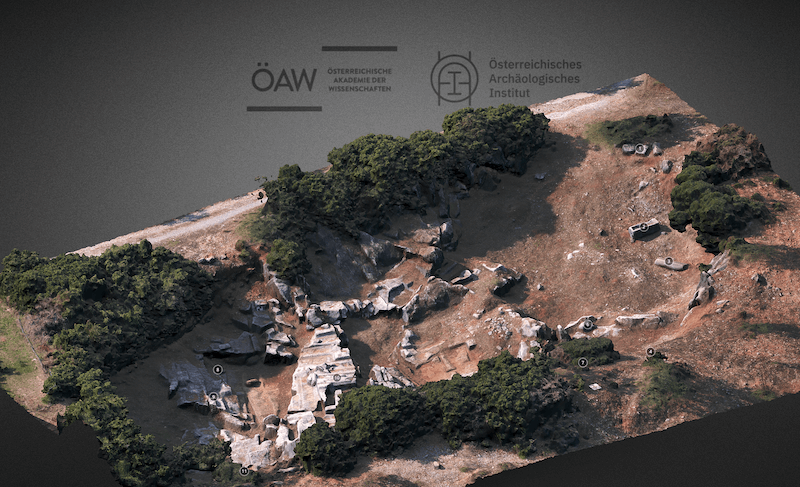
3D model and text: OeAW-OeAI/V. Anevlavi, C. Kurtze, January 2019. Austrian Academy of Sciences, Austrian Archaeological Institute, Vienna. Source: sketchfab.com
Limitations
Excavation sites are inherently difficult to explore, because the utmost care is required so as not to destroy any materials. This makes it harder to capture good, comprehensive images from all angles, since a tripod cannot be set up everywhere. Moreover, the costs are not to be neglected, since technical expertise is also required. It also cannot be ruled out that individual objects are damaged during image capture, which is why this technique cannot be applied to all objects without restriction. In addition, ethical aspects should be taken into account, especially when dealing, for example, with human remains.
Opportunities
The ability to make relics from the past accessible with the help of software naturally offers a huge opportunity for people’s education and further training. By making things “experienceable,” it helps many people enormously with learning. It is much easier to remember something when you have seen it, been able to interact with it and perhaps even, in the future, have the chance to touch things. But this is extremely practical not only for conveying existing knowledge; AR in archaeology can also be used to generate new knowledge.
With many objects it cannot be prevented that they wear out over time and that information is lost. For this reason it is often not permitted to touch the objects. Virtual representation, however, allows researchers to examine the object in detail without the risk of irretrievably losing or destroying something. This gives rise to further opportunities as well: in recent years, many museums and research institutes have worked intensively to return objects that came into their possession unlawfully. From a research point of view this may represent a loss, even though it is ethically right. A digital copy makes it possible to meet these ethical standards while at the same time not only preserving the knowledge but also retaining the possibility of generating new knowledge.
AR in the museum: the example of historical books
As the archaeology example already clearly shows, AR can contribute enormously to making old objects accessible. This applies not only to excavation finds but also to old books. Since, before the invention of printing, these were laboriously written by hand, often only a few copies — or even just a single one — exist. Even printing does not prevent the ageing process of paper and similar materials. For this reason, old historical books are often locked away in order to preserve them.

Source: Pixabay
The “museum4punkt0” project is dedicated to precisely this problem. Museum visitors can gain interactive access to these objects. The Weimar+ app is used to show a three-dimensional representation of the library holdings, which can then be interacted with via smartphone or tablet. The viewer can even take selected books “digitally” off the shelf and leaf through them. In addition, special features of the copy are conveyed in short audio guides.
Experiencing haptics through AR: the example of haptic gloves
Since the launch of the first VR headset, the metaverse is no longer pure fiction. Alongside phenomena such as VR-Tube and virtual conference rooms, however, the metaverse is still missing one decisive factor for many workplaces: haptic feedback. Although sound and image can already be delivered to us and virtual “stand-ups” are made possible, the illusion vanishes as soon as we try to touch something with our hands in the virtual world. We feel… nothing. Although our brain perceives an object in front of us — because this information is transmitted by our eyes — there is a discrepancy between our physical and audiovisual sensors that can, in some people, also trigger noticeable discomfort.
But what if this problem had already been solved? In the field of video game development there is already enormous progress. With the help of vibrations and electrical resistance, the drawing of a bow can be simulated in the VR gaming realm, for example. There are special controllers for different types of games, and in virtual tennis you already feel haptic feedback when the “racquet” touches the ball. The further development of this technology includes haptic gloves, and the best part is: they are no longer fiction. Through various sensors, small motors or even air — as in a blood-pressure cuff — it is ensured that, matching the image we see, feedback is also passed on to the skin of our hands.
Limitations
Since this is a relatively new technology, it may under certain circumstances still be quite expensive. The SenseGlove Nova gloves cost just under €5000 and are therefore really not for the private household. In the business sphere, too, the added value must be carefully scrutinised. Above all because the gloves alone are not enough. In addition, a VR headset and the corresponding software are needed. There are certainly use cases in which it can make sense, especially if you know that in the future you will increasingly work in the field of mixed reality. At the present time, however, there are still many question marks regarding the costs, the hardware and, above all, the software.
Opportunities
As already hinted, the opportunity of haptic gloves surely does not lie in feeling a virtual Post-it on a board. The possibilities lie rather in industries that work with virtual models and interact with them. For companies that develop tangible new products, the entry barrier may initially be high. But the ability to become aware of design flaws on a virtual object in turn saves the cost of producing a physical prototype and can be a gain in the long run.
Virtual training of personnel can also make sense, especially in very sensitive areas of work, such as with trainee surgeons or in a military context. In both cases, haptic feedback alongside virtual simulation training can be decisive. At the same time, these are scenarios in which you do not want to practise on real living beings.
AR in the workplace: the example of Spacetop
Apart from virtual meetings in the metaverse, there are also other ways to apply AR in everyday work. One of the latest developments in this area is the “Spacetop.” Many people know the problem: you’re working with five different windows at once on your computer, and there just isn’t enough screen space. Especially when working from home, it can happen that the desk doesn’t offer enough room for additional monitors. Working while travelling has also arrived in the digital world of work, and if you’re on the road in a motorhome, you tend to have fewer options for using several monitors.
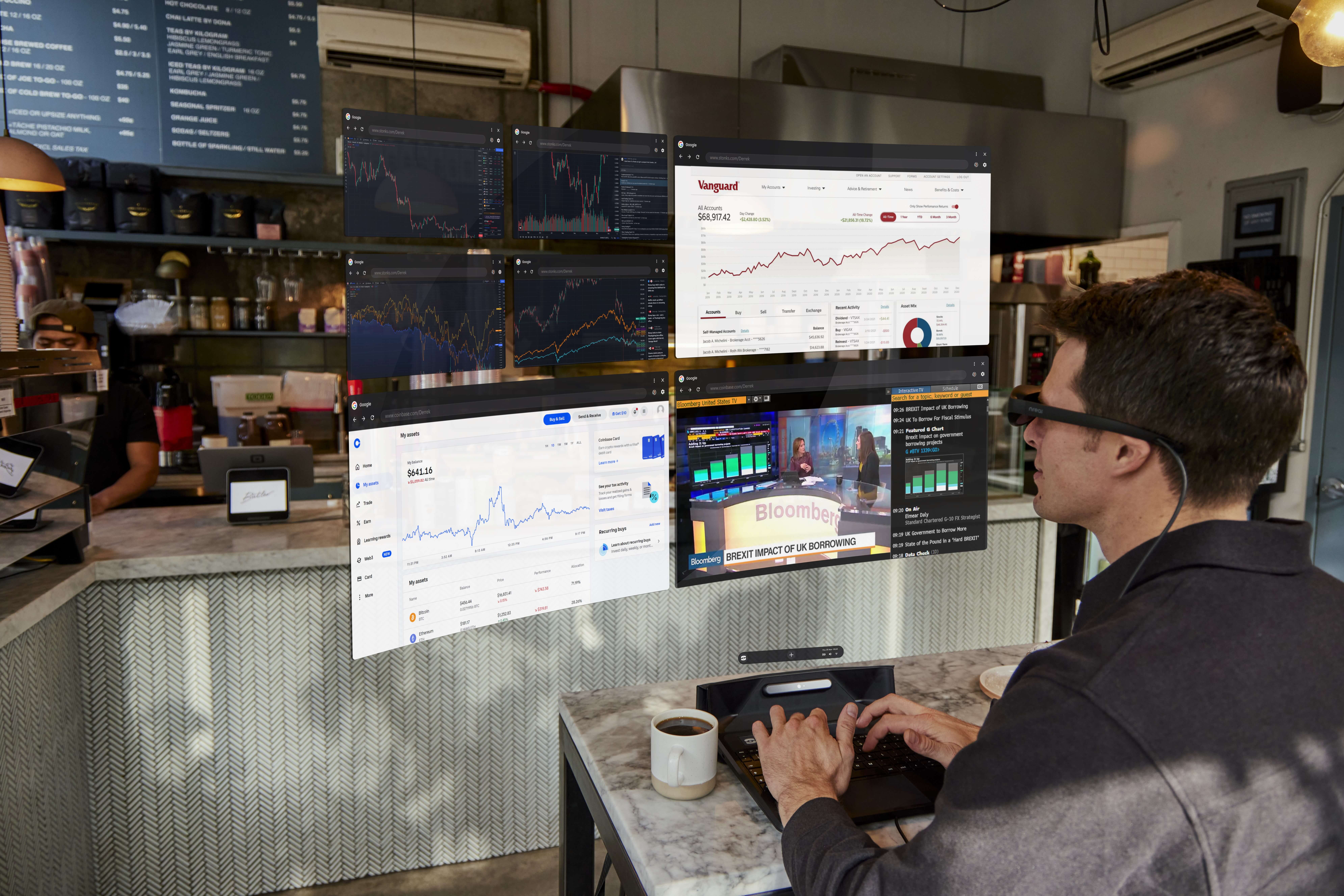
Source: sightful.com
This problem is addressed by the “Spacetop.” It is a laptop without a physical screen. Instead, a pair of glasses adaptively projects the windows “into the air,” and you can operate several screens without real monitors. The laptop is developed and sold by the startup “Sightful.” How well this innovation can really be integrated into everyday work, and whether in the future we will all actually be lying on the beach, remains to be seen.
Conclusion
AR is now finding application in many areas, even if some innovations certainly still have room for improvement. There are numerous examples, and this was only a small preview of everything that is possible with AR. From the Microsoft HoloLens to projections for surgeons, the possibilities are endless, and it remains exciting to see what the future will bring.
Originally published at SEQIS Blog