Codeium – the only sensible code assistant?
A field report after more than six months with an AI coding assistant in VS Code
Every programmer knows at least one activity in software development that they would rather delegate or automate. For some it’s unit tests, for others it’s code cleanup.
Especially with regard to repetitive tasks, AI language models promise liberation and more time for those tasks that require experience or our creativity. But can the currently available assistants really offer support here?
It was important to me to gauge the capabilities of a code assistant with integration into VS Code. Even if it were to mean only a small speed-up for tasks I dislike, that would already be a big win. But before I could decide on an integration, it was necessary to shed light on how the various providers handle the topic of data protection and what significance that has for us as programmers in general and for contract work for third parties in particular.
Copy right vs copy wrong
That the copyright problem is extremely relevant, especially for commercial users, has by now reached the players in the field of AI language models too. For this reason, of the most common AI assistants there are at least certain versions available that, according to the end-user agreement, do not use the data to train new AIs. For example, Microsoft Copilot, formerly Bing Enterprise, includes such a clause in its contracts. This assistant, however, is only available with certain enterprise or university licences. The same applies to ChatGPT, but this version is hidden behind their Enterprise version, for which not even a publicly known price exists.
Codeium, an AI coding assistant with plugins or extensions for, among others, JetBrains IDEs and VS Code, allows users by contrast — even with their free version — to prevent the use of their own telemetry (e.g. local latency, which features were used, how many suggestions were accepted or rejected, etc.) via a simple opt-out. Beyond that, Codeium generally does not use any user code to train their AIs. According to their marketing material, however, Codeium has yet another unique selling point that is very relevant, especially for the use of AIs as a programming assistant, which I go into in the next chapter.
Illegality by assistance – one solution approach
It is one thing when users, through their questions to the AI, sometimes supply the company behind it with secret data that either should not leak to the outside or that puts one’s own intellectual property at risk. But it is quite a different matter when the company providing the AI feeds it with an incredible amount of data without one hundred percent ensuring that no secret or patented code examples appear in the training data. If the respective coding assistant now spits out protected code and the programmer adopts it, then the question arises for me of how the situation is to be viewed from a legal point of view. It may well be very difficult after the fact to prove that a foreign, non-open algorithm found its way into one’s own codebase through such AI assistance.
Now, however, it cannot reasonably be expected of any user to check every generated piece of code for the presence of patented code parts.
This is exactly the gap that Codeium fills with their integration. According to their website, Codeium has processed the training data so as to ensure that all non-public code parts are removed from it. That using only open-source datasets is not enough for this, Codeium demonstrates in an interesting blog article. Briefly summarised, the problem is that open source does not automatically mean that commercial projects may also be built on top of it. This kind of use of open-source projects falls under a special subset of licences, so it is not enough to make sure only to use open-source data for training. Codeium claims of itself here to remove all problematic data with the help of filters and even manual modifications. Even if this claim is hard to verify as a user, the mere fact that the company gives it thought shows, for me, the right approach to providing such services. Because of this, Codeium was the only assistant with VS Code integration that came into consideration for a closer look.
But what, then, is the verdict after more than 6 months during which I used Codeium?
Still a long way to the perfect assistant
At rzfz.ai we use TypeScript for programming our current project. For all those who have no experience with TypeScript: TypeScript’s types are “only” a compile-time feature, i.e. at runtime the types and the information they provide are no longer present. On the one hand, this means for the programmer a certain rethinking in the use of types; on the other hand, the language therefore does not offer the same run-time features as, e.g., Java. This complexity is challenging not only for developers but also for Codeium’s “fill-in-the-middle” function.
The difficulty lies, among other things, in the fact that in TypeScript, as in any other language, there are a lot of ways to reach the same goal — but coupled with the additional difficulty of a complex, optional type system. If you have additionally agreed on certain coding conventions in a codebase and created a lot of types, then the AI’s suggestions become less and less valuable, because the amount of “meta-information” simply becomes too large. It then frequently proposes generic solutions that do work but are strictly speaking wrong, because they use a different style or do not apply types defined elsewhere in the codebase. This quickly puts you in a situation that resembles a constant code review of foreign code. This poses a completely different challenge to “simple” programming and requires far more concentration. This problem can indeed be improved from the side of the AI developers by giving the AI more context. But that puts you right in the middle of the context vs. latency problem, which currently represents the greatest challenge for cloud-based AI models.
Latency vs context length – out of the frying pan into the fire
If you want to get better answers from a large language model (LLM), it needs, among other things, more input data via the prompt, the so-called context. However, cloud-based systems here have a double challenge: firstly, they have to transmit the context over the internet connection, which takes a certain amount of time. Secondly, the model’s inference — that is, generating the answer — also takes a certain amount of time, and the answer has to be delivered back to the user over the same internet connection. The whole thing is made more difficult by the fact that, with growing context length, the LLM’s answer also takes more time. So the developers of these integrations have to find a sweet spot here. If the latency is too great, then the AI can’t even keep up with moderately fast typists. If, however, the context is too short, then the AI’s answers become less and less specific and thereby largely useless for the user.
Codeium, too, finds itself in exactly this tension with its VS Code integration. Even as a not very fast typist I notice that the integration takes a certain amount of time to make a suggestion. The feeling is not comparable to normal auto-completion. Over time a kind of “stop-and-go” programming set in for me, because I subconsciously wait for the AI’s suggestion. When that suggestion then doesn’t fit either, it’s all the more annoying. At least it can be expected that, precisely here, newer AI models will deliver a speed-up and that the quality of the answers will get better even with less context. But Codeium has also come up with a way to use the user’s knowledge of their own codebase and to employ it for creating a sensible context. This feature was introduced as a prototype in March 2024 under the name “Context Pinning.” This is a way, in the assistant’s configuration, to specify files or directories that contain especially relevant information. For TypeScript these would be, e.g., files with type definitions or helper classes. In the first tests of Codeium using this feature, no massive jumps in code quality showed up yet, but that is also not the expectation of a prototype feature.
It shows, however, once more the right approach of Codeium: the goal is meant to be a genuine collaboration between AI and programmer. And for that, it is necessary to put low-threshold tools into the user’s hands with which the AI can be tailored to their own needs. Beyond a model that has been trained on the complete codebase itself, every algorithm will have a hard time recognising exactly where the important places in the code are to be found. The idea of “context pinning” is thus a win-win situation, since Codeium saves itself part of the development of a model for context recognition, and the programmer gets the opportunity to focus and personalise the assistant precisely. With the current UI it is even possible to modify the context before a chat request, in case only a subset of the marked files is relevant.
For the sake of completeness it should also be said that Codeium offers the possibility of storing a short “default prompt” that is appended to every request. This enables a further personalisation of the assistant, e.g. if I use a particular framework and want Codeium to base its answers on it. Other AI assistants such as ChatGPT offer similar possibilities, so I won’t go into it in more detail here.
Collaboration between human and machine
There are tasks in programming for which neither fill-in-the-middle nor a separate chat window is the right approach. Thus you may find yourself in the situation of being able to describe in simple words what you want to achieve with a piece of code, but not knowing exactly how best to approach the task. Or you have a piece of code that you want to refactor in a certain way that is easy to describe but hard to automate.
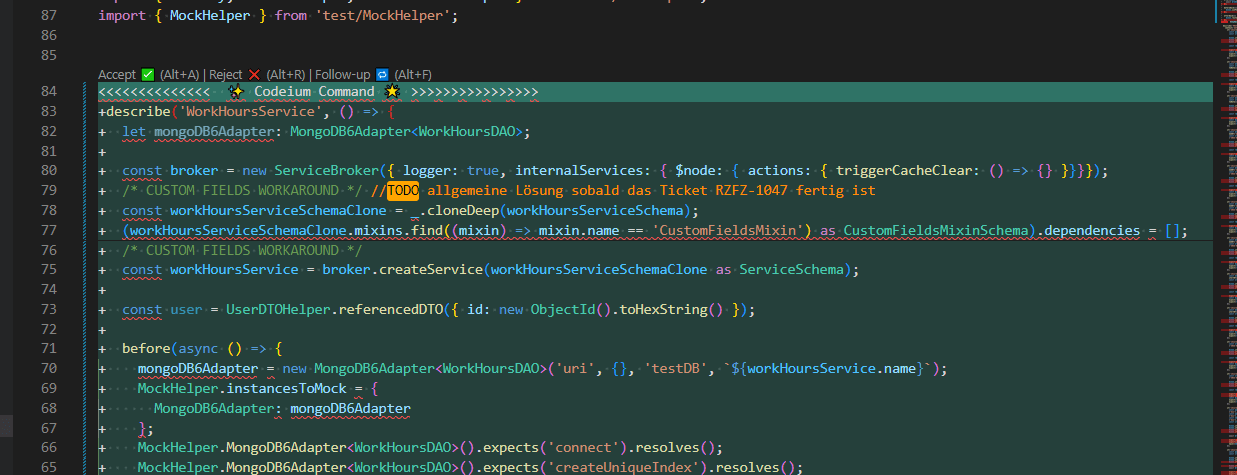
Here the great advantage of another module of Codeium shows itself: Codeium Command. This module makes it possible, directly in the IDE’s editor, to open a window through which instructions can then be given to the AI assistant. It then creates a suggestion diff that can either be accepted directly, rejected, or modified via the “follow-up” function. The latter is helpful when the suggestion almost matches the desired result but just needs smaller adjustments. As always in conversation with an AI assistant, over time you learn how to structure the “prompt” and which information is important. For example, with repeating refactorings you can mark an already-rewritten block together with the block to be refactored, and thus give the AI an example of which structure it should stick to. Or you copy this block of code into the command window and thereby give the AI a reference point for the desired structure.
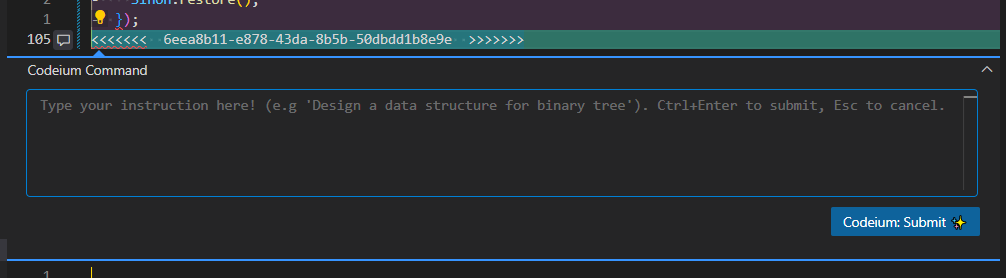
An interesting psychological effect when using Codeium Command was that it required far less cognitive effort to check the code generated this way. That may on the one hand be because, by using the command window, you consciously put yourself into a “code review” situation; on the other hand, the formatting of the suggestion as a diff is easy to read, and a format that every programmer knows well from reading Git commits.
Conclusion
For me, Codeium Command turned out to be the most helpful module in normal programming. Fill-in-the-middle still has quite a way to go, because of the latency problem and the quality of the code suggestions, before it offers similarly disturbance-free support as, e.g., IntelliSense. Codeium Chat, in turn, may be interesting for exploring unknown repositories, or to save yourself opening a browser window and searching the internet, but here too it shows that the models, above all GPT 3.5, are not yet quite where you would wish them to be for good support. However, it can be expected that, especially here, newer models will perform far better and will gradually also be rolled out to the free tier. For users who have taken out a paid subscription, Codeium already provides a chat based on GPT 4.
Codeium Command, however, offers good support in a relatively narrow field of application, and achieves this in turn on the one hand by restricting what the AI is given as a task, and on the other by offering the developer a simple way to guide the AI. And precisely for me, Codeium here offers a real improvement with tasks that are tiring due to their repetitive nature.
Even if Codeium is still at the beginning and therefore presumably does not yet represent a great support for every programmer, I would nevertheless like to give it a recommendation, in the hope that as many people as possible at least dare the experiment and install the integration. As users of such AI assistants, we here have not only the possibility but, in my view, also the obligation, through the choice of our tools, to help shape the development in this field.
And since, in my eyes, Codeium in particular gets so much right in the development of a code assistant, I hope that this integration is successful and can thus also serve as a good example of what matters in an AI integration: collaboration between AI and developer, an easy-to-use UI, and good, easy-to-use customisation options.
Since Codeium is available for free in its basic variant, this is an experiment that many will hopefully dare to try.
Originally published at SEQIS Blog